
Subscription and plans
The subscription page shows your plan, how much of it you use, and the plans to grow with. Payments happen outside AthleteOS: you send a request from this page, and we confirm the details with you. Admins open it from the menu under their name: Subscription.
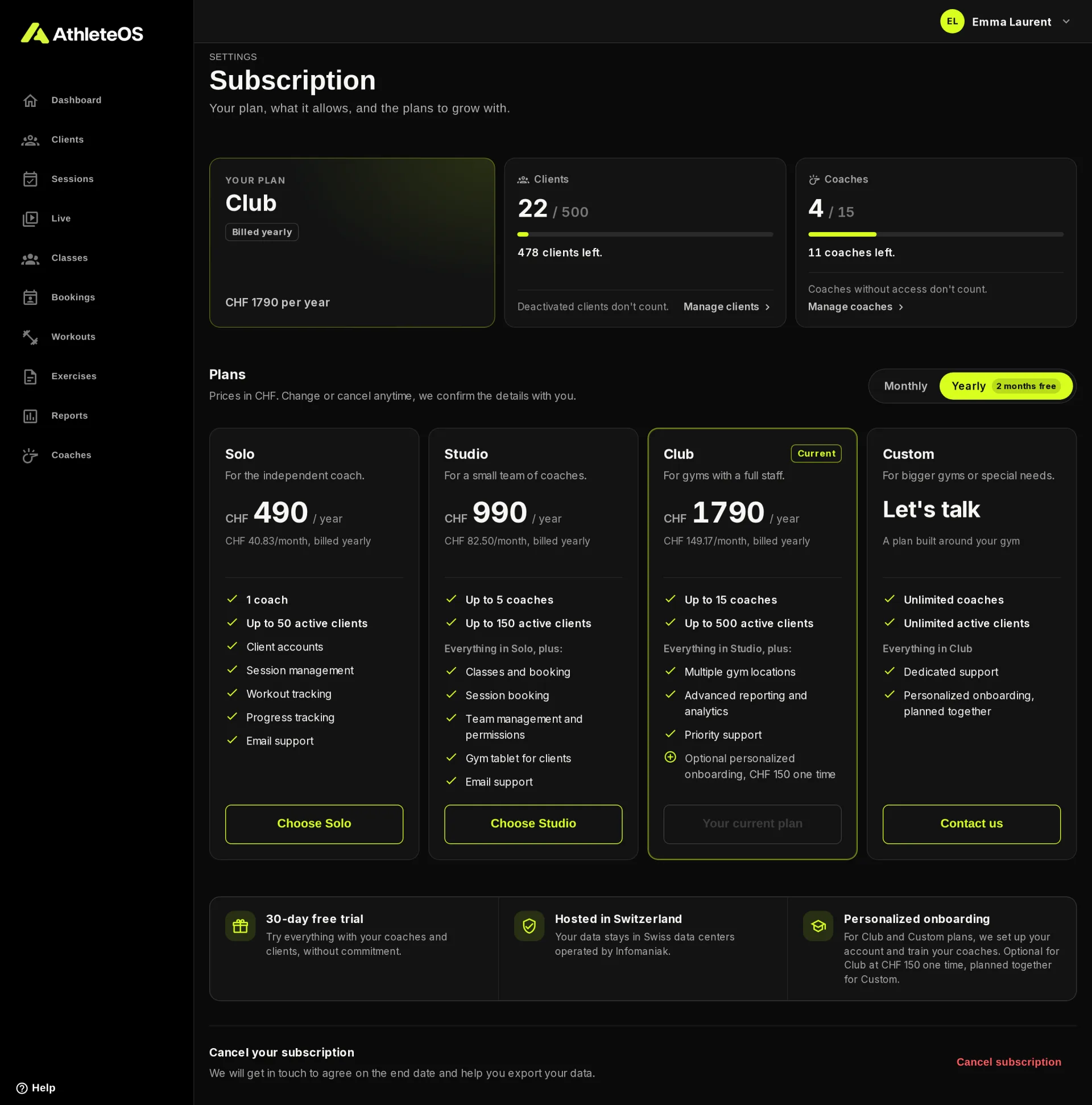
Your plan and its limits
- Your plan: the name of the plan, how it's billed and its price.
- Clients and Coaches: how many you use out of what the plan allows, e.g. "22 / 500". A badge warns you when it's Almost full (from 80%) or Full.
Only active people count: deactivated clients and coaches without access don't.
When a limit is reached, adding a client or a coach is refused until you make room or change plan.
The plans
Prices are in CHF. A yearly subscription costs ten months: two months are free.
| Solo | Studio | Club | Custom | |
|---|---|---|---|---|
| For | The independent coach | A small team of coaches | Gyms with a full staff | Bigger gyms or special needs |
| Coaches | 1 | Up to 5 | Up to 15 | Unlimited |
| Active clients | Up to 50 | Up to 150 | Up to 500 | Unlimited |
| Monthly | CHF 49 | CHF 99 | CHF 179 | Let's talk |
| Yearly | CHF 490 | CHF 990 | CHF 1790 | Let's talk |
| Client accounts, sessions, workouts, progress | ✓ | ✓ | ✓ | ✓ |
| Classes and booking | ✓ | ✓ | ✓ | |
| Session booking | ✓ | ✓ | ✓ | |
| Team management and permissions | ✓ | ✓ | ✓ | |
| Gym tablet for clients | ✓ | ✓ | ✓ | |
| Multiple gym locations | ✓ | ✓ | ||
| Advanced reporting and analytics | ✓ | ✓ | ||
| Support | Priority | Dedicated | ||
| Personalized onboarding | Optional, CHF 150 once | Planned together |
When someone opens a page their plan doesn't include, AthleteOS takes them back to the dashboard with a message like "Classes and booking is part of the Studio plan. Ask an admin of the gym to change plan."
The free trial
A new gym can try AthleteOS for 30 days, with every feature and the room of the Club plan. The page shows how many days are left, and recommends the smallest plan that fits how you use AthleteOS.
Change plan
- Under Plans, choose Monthly or Yearly.
- Click Choose on the plan you want, e.g. Choose Studio.
- Fill in the invoice details: the name of the gym or company and the billing address. On the Club plan, you can add the onboarding.
- Add a message if you like, and click Send request.
We reply by email to confirm the details and the date of the change. For the Custom plan, click Contact us.
Cancel your subscription
At the bottom of the page, click Cancel subscription, add a message if you like, and send the request. Your account stays open until we agree on the end date together, and we help you export your data first.
Hosted in Switzerland
Your data stays in Swiss data centers operated by Infomaniak.